
The software at a glance
- Daily work: nozzle sales, lube sales, credit sales, bulk sales, fuel purchase, gain/loss, cash and bank vouchers, all on one Forecourt Transaction Sheet
- Tanks: dip chart calculation, tank stock, gain/loss and dip shortage
- Credit: vehicle-wise and customer-wise credit, credit limits, monthly bills and recovery
- Accounts: chart of accounts, vouchers, day book, trial balance, balance sheet, profit and loss
- Control: user rights, activity log, Google Authenticator, backup
- Anywhere access: mobile app for reports and entries, WhatsApp integration
- Many businesses: one station, many stations, and extra shops such as a tuck shop or car wash
- Compliance: FBR digital invoicing ready
If you want to see it working on your own station’s numbers, skip to the demo form. If you want to understand every screen first, keep reading.
Part 1: Setup, starting from the chart of accounts
Good petrol pump software starts before the first sale. If the setup is wrong, every report built on it is wrong too. That is why this guide starts here, and why we start with the accounts: a fuel station is a cash business with stock, credit and suppliers, and every one of those must land in the right account.
1.1 Chart of accounts
The chart of accounts is the list of every account your station uses to record money. Think of it as the filing system for your whole business. Each rupee that comes in, goes out or is owed gets filed under one account, so that at any time you can ask the software a simple question: how much cash do I have, how much do customers owe me, how much do I owe suppliers, and what did I earn this month?

A fuel station chart of accounts usually has five groups:
- Assets: cash in hand, bank accounts, fuel stock (petrol, diesel, Hi-Octane), lubricant stock, credit customers (money owed to you), advances
- Liabilities: suppliers and oil companies (money you owe), staff payables, tax payable
- Capital: owner’s capital and drawings
- Income: fuel sales, lubricant sales, bulk sales, other income such as shop or car wash income
- Expenses: fuel and lubricant purchases, salaries, electricity, rent, repairs, bank charges, and dip gain/loss
In 4TechCo you set up your accounts once, and every voucher you enter later is posted against them. When you enter a cash payment on the Forecourt Transaction Sheet, for example, the software already knows which accounts it touches. You never re-type the same figure in an accounts book at the end of the month.
Why does this matter so much? Because three of your most important reports depend on it: the trial balance, the balance sheet and the profit and loss statement. If you build the chart of accounts carefully on day one, these reports are ready at any time and need no manual work. If your accountant is outside the station, he can read the same accounts you do.
Tip for multi-business owners: if you run a tuck shop or car wash next to the pump, give each business its own income and expense accounts. You will then see profit for the pump and for the shop separately, instead of one mixed number.
1.2 Items: fuels, lubricants and shop products
Items are everything you sell or buy. For a petrol pump these fall in three families.
Fuel items are petrol, diesel and Hi-Octane (HOB). Each fuel is one item with its own rate, and each is linked to the tank or warehouse where it is stored. When your supplier changes the price, you update the rate once and every sale from that moment uses the new rate.
Lubricant and car-care items are engine oils, gear oils, brake fluids, filters, additives and coolants. These have brands, pack sizes and a stock quantity. Lubricants are where many stations lose track of stock, because there are hundreds of small packs. Setting them up as items gives you a stock figure for each and a low-stock alert before you run out.

Shop items are for a tuck shop, a car wash or anything else you sell. They are set up the same way and appear in the same reports.
Group your items into categories (fuel, lubricants, filters, shop). Categories make reports easier to read, for example “lubricant sale this month by brand”.
1.3 Storage tanks and the dip chart

The underground tank is the heart of a petrol pump. Its stock cannot be seen, so every owner relies on a dip reading: a measuring stick goes into the tank and the wet length is read off. That length does not directly tell you litres. A tank is a horizontal cylinder, so the first few centimetres hold far less fuel than the middle centimetres. A dip chart (also called a calibration chart) converts each dip length into litres for that particular tank.
In the software you create each tank once, with:
- the fuel it stores
- its total capacity in litres
- its dip chart, so every dip reading converts to litres automatically
From then on you type the dip reading and the software gives you the litres. You do not need a printed chart or a calculator, and you do not risk a wrong lookup at the end of a long night shift.
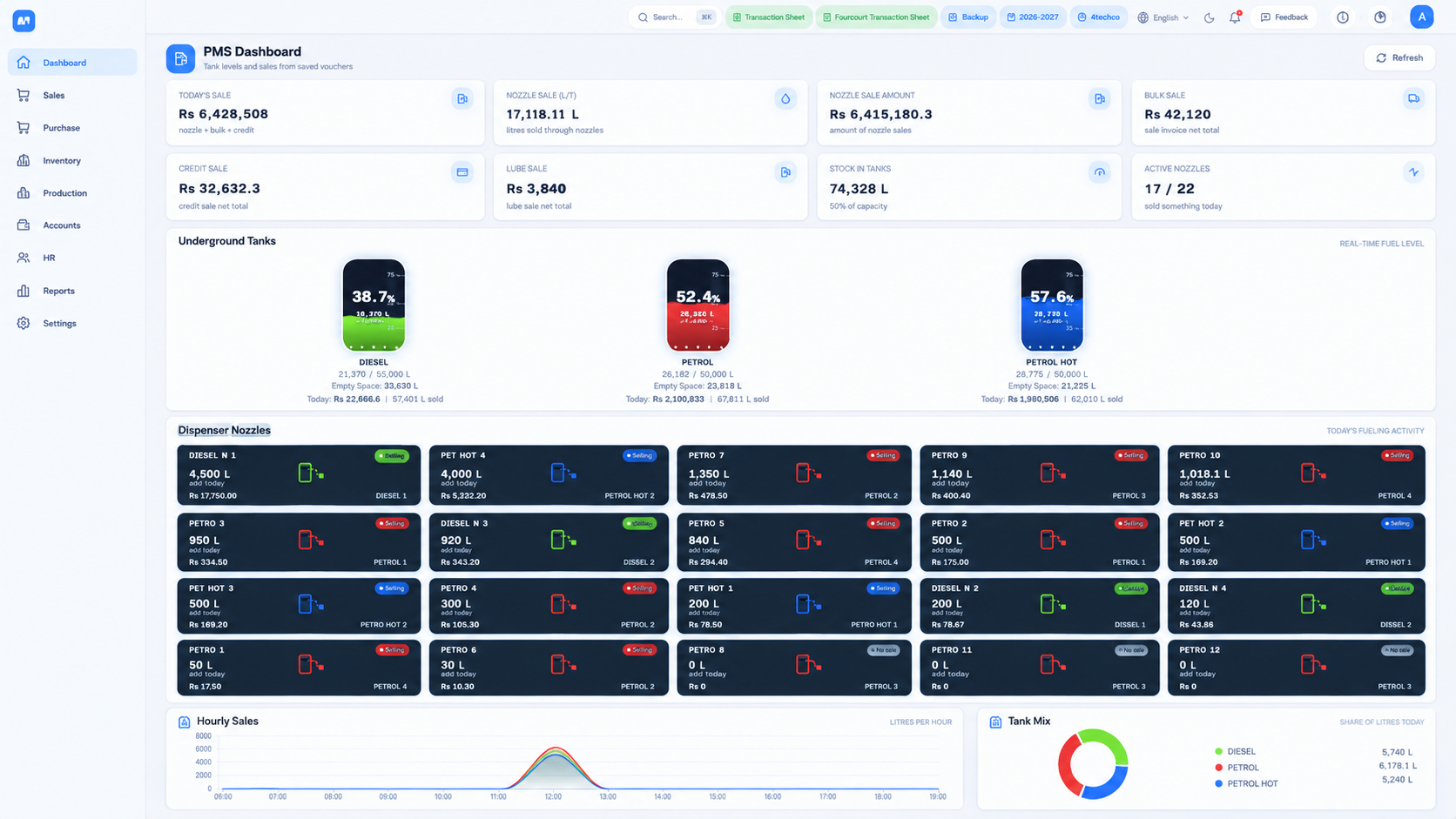
The dashboard then shows each tank as a gauge with the level in percentage, the litres in the tank and the capacity. Petrol, diesel and Hi-Octane stock sit side by side so you see all of it in one look.
An example. Suppose your diesel tank holds 20,000 litres and the dip chart says 142 cm equals 11,860 litres. You dip at 142 cm and the software shows 11,860 litres, about 59 percent. Your book stock, which is opening stock plus purchases minus sales, says 11,900 litres. The difference is 40 litres, and the software records it as dip loss. You can see this the same day, and you know which tank, which fuel and which shift to look at.
1.4 Dispensers and nozzles
A dispenser is the machine on the forecourt, and each dispenser has one or more nozzles. Each nozzle sells one fuel from one tank. In the software you register your dispensers and nozzles and link each nozzle to its fuel and tank.
The key number for a nozzle is its meter reading. Every nozzle has a meter that counts total litres delivered since it was installed. At the start of a shift you note the opening reading, at the end the closing reading, and the difference is the litres that nozzle sold. The software keeps the last closing reading as the next opening reading, so a gap or an overlap between shifts is easy to catch.

With nozzles registered, you will later see sales per nozzle, per fuel and per shift. If one nozzle is always behind the others, or one attendant’s shift always shows less cash than the meters say, you will see the pattern in the numbers.
1.5 Customers, vehicles and credit limits
Credit sale is where a petrol pump makes extra volume and also where it takes its biggest risk. A factory sends its trucks every day, a transport company fills twenty vehicles a week, an office has a fleet of cars, and all of them pay later. If you track this on slips, some slips disappear and some balances are forgotten.
In the software, every credit customer is an account. Under that customer you register the vehicles that are allowed to take fuel on credit, by their number plates. When a vehicle comes to the pump, the attendant picks the vehicle and the customer’s account is charged. This gives you two views of the same credit: by customer (how much does this company owe me in total) and by vehicle (which truck took how much fuel this month).
Each customer can have a credit limit. When a new sale would push the balance over the limit, the software warns you before the fuel is delivered, not after. You decide what to do: stop the sale, ask for payment first, or approve it. The warning is the point. It turns credit control from an end-of-month argument into a decision at the moment it matters.
Credit customers are the base for three later features: the monthly bill, the outstanding balance report and the defaulter report. We cover those in Part 4.

1.6 Suppliers
Your suppliers are the oil marketing companies, depots, lubricant distributors and anyone else you buy from. Each supplier has an account in the software. When you post a purchase, the supplier’s balance goes up, and when you pay, it goes down. At any time you can open a supplier’s ledger and see every purchase and payment, in order, with the running balance.
This matters at the moment of dispute. If a supplier says you owe a certain amount, you open the ledger and check the dates, the quantities, the rates and the payments. You do not rely on memory.
When you enter a fuel purchase, you also record any dip shortage on that tanker, so the shortage is attached to that delivery from the first day. We show this on the purchase screen in Part 2.

1.7 Staff, shifts, users and rights
A petrol pump runs in shifts, and shifts are run by people. The software reflects both.
Shifts. You define your shifts, for example morning, evening and night, each with a start and end time. Every entry on the Forecourt Transaction Sheet belongs to a shift and a date, so you can look at any single shift later and see what happened in it.
Shift incharge. For each shift you choose the person in charge. When cash is short or a reading is wrong, you know who ran that shift.
Users and rights. Not everyone should see everything. A pump attendant should enter sales but not see profit. A manager should close shifts but not delete old vouchers. The owner should see all stations and all reports. In the software you create a user for each person and decide what each user can open, add, edit or delete.
Google Authenticator for every user. Each user has their own login, and each login can be protected with its own Google Authenticator code. This means a password alone is not enough to get in. If a password is shared, guessed or seen over a shoulder, the person still cannot sign in without the code on that user’s own phone. We explain the full security setup in Part 5.
Activity log. The software records who did what. If a voucher is changed, you can see the user, so changes are never anonymous.

1.8 Opening balances and the financial year
You are probably not starting a new business, so you must bring your current position into the software. These are your opening balances:
- cash in hand and bank balances
- opening stock for each fuel tank and each lubricant item
- what each credit customer owes you
- what you owe each supplier
- any other balances from your accounts
The software works within a financial year (for example 2026-2027), and it is shown at the top of every screen so nobody enters a sale in the wrong year. When the year ends, balances carry forward. On the forecourt sheet you will see this as a previous balance line in the cash summary, so each shift starts from where the last one ended.
A practical way to load the numbers: pick a start date, usually the first day of a month. Count the stock and cash that day, collect the customer and supplier balances from your last accounts, and enter them. From then on, every report is built from a clean base.
Before you go live you can also run both systems side by side for a short time. We describe this plan in Part 6.

Part 2: The Forecourt Transaction Sheet, your daily shift screen
If Part 1 is the foundation, the Forecourt Transaction Sheet is the house. It is the one screen where a shift is recorded and closed. Everything that happens on the forecourt in a shift goes through it: fuel bought, nozzles sold, lubricants sold, credit given, bulk sales, tank gain or loss, and every rupee of cash and bank movement. At the end, the same screen tells you how much cash you should have and whether the cash in the drawer matches it.
2.1 How the sheet is laid out
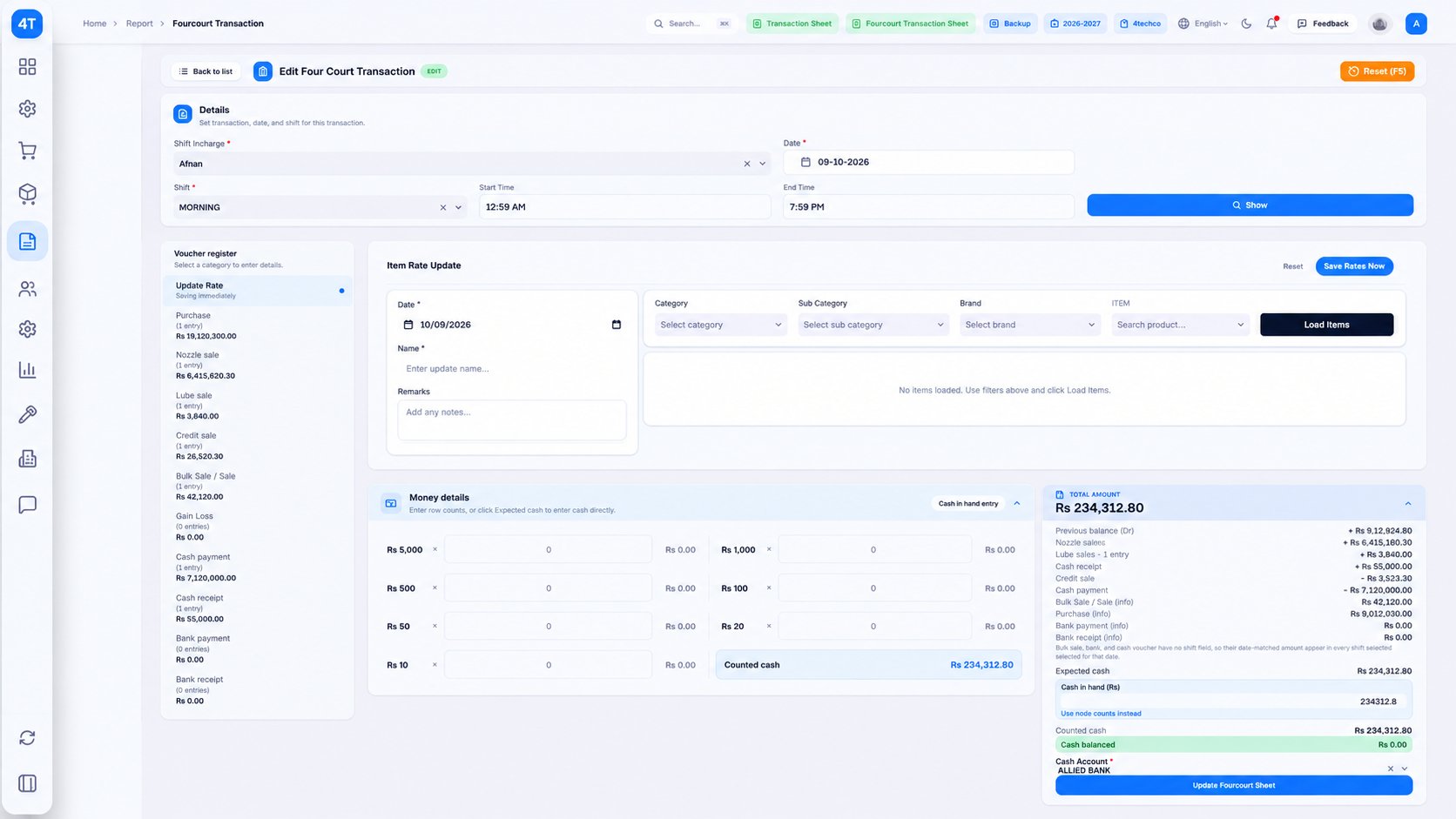
The sheet has four areas, and once you know them you can find anything in seconds.
The top: shift details. Here you choose the shift incharge, the date and the shift (for example Morning). The shift’s start and end time appear automatically. You press Show, and the sheet loads everything already entered for that shift.
The left: the voucher register. This is a list of every kind of entry a shift can have, with the number of entries and the total amount next to each. The categories are:
- Update Rate
- Purchase
- Nozzle sale
- Lube sale
- Credit sale
- Bulk Sale / Sale
- Gain Loss
- Cash payment
- Cash receipt
- Bank payment
- Bank receipt
You do not hunt through menus. You click a category and its entry form opens on the right. The numbers beside each category let you see at a glance what has been entered and what is still missing. If “Nozzle sale” says 0 entries at the end of the shift, you know something was skipped.
The right: the entry form. This is where you type the actual entry for the category you picked.
The bottom: money. The Money details box is where you count the cash, and the Total amount box gives the expected cash and tells you whether the drawer is balanced.
Two keyboard shortcuts keep the work fast: F10 adds the current entry to the shift close, and F5 resets the form. A staff member who enters hundreds of entries a week appreciates this.
2.2 Update Rate
Fuel prices change, and in Pakistan they change often. The Update Rate entry is where you record the new rate for a fuel. It saves immediately, so there is no separate step to forget. From that moment, new sales use the new rate.
This simple feature protects your profit. A rate update that is made late, or only in your head, means a few hours of fuel are sold at the wrong price, and that difference is a direct loss. Having a dedicated entry also leaves a record of when each rate changed.

2.3 Purchase: recording a fuel tanker
Purchase is the entry you use when a tanker arrives or when you buy lubricants. It is the most detailed form on the sheet, because a purchase has a lot to capture, and getting it right protects both your stock and your supplier balance.
Details. You choose the supplier. You can also link the purchase order reference if the purchase came from an order that is still pending, so the order is closed when the goods arrive. Due days is optional and records how long you have to pay. A Delivery & Contact Details block, also optional, holds the delivery information.
Line items. Each line has the item, the warehouse (the tank or store it goes into), the quantity, the rate, the gross amount and the net amount. One tanker may bring several fuels, so you add one line for each. A single invoice might hold 10,000 litres of diesel, 12,000 litres of petrol and 5,000 litres of Hi-Octane, each into its own tank. The total quantity and total amount are shown under the lines.
Notes and summary. The invoice has a place for internal notes (visible only to your team, for delivery instructions or payment terms) and a summary showing the subtotal, global discount, freight or expense, sales or further tax and the grand total.
Bilty and transport. Fuel arrives by tanker, so the form records the bilty number, the bilty date, the transporter, the freight amount and the freight type. When you later need to trace a delivery, or settle freight with the transporter, the details are already attached to the purchase.
Dip shortage. This is the part that saves real money. When a tanker unloads, the quantity in your tank after unloading may be less than the quantity on the invoice. Your dip measurement shows the difference. The form has fields for the shortage or excess quantity (plus or minus) and the amount, calculated at the rate. You record it right there, on the same purchase.
An example. A tanker brings 12,000 litres of diesel at Rs 350 per litre, so the invoice is Rs 4,200,000. After unloading you dip the tank and find it received 11,965 litres. The shortage is 35 litres, which at Rs 350 is Rs 12,250. You enter the shortage on the purchase. Now your stock is correct, your supplier ledger shows the shortage clearly, and you have the exact figure to raise with the supplier. If you had skipped this step, the 35 litres would show up weeks later as an unexplained loss in your tank, and nobody could say where it came from.
When the form is complete, you press Add to Shift Close (F10). The purchase joins the shift, the stock updates, the supplier’s balance goes up and the voucher register on the left shows it.

2.4 Nozzle sale: the meter reading that drives your revenue
Nozzle sale is the entry you will make most often, and it is the foundation of your daily revenue. It records how much fuel each nozzle actually sold in the shift.
For each nozzle, the entry works from its meter readings: the opening reading at the start of the shift and the closing reading at the end. The difference is the litres sold. Multiply by the current rate and you get the sale amount. The software does the subtraction and the multiplication, so there is no calculator and no arithmetic mistake at the end of a tiring night.
From these entries the software builds your sale figures by nozzle, by fuel and by shift. You can answer questions that were impossible with a register: Which nozzle sold the most today? How much diesel did the night shift sell this week? Is one nozzle consistently selling less than the others?
Two details matter on a real forecourt.
Nozzle testing. Dispensers must be tested regularly, and a test delivers fuel that is not a sale. If this is not recorded, the meter says fuel was sold but no money came in, and the shift looks short. The software lets you record the nozzle test and return the tested fuel to the tank, so stock stays correct and the shift is not unfairly blamed for the missing cash.
Cash, credit and card on one sheet. Not all fuel sold is paid in cash. Some goes on credit to a regular customer and some is paid by card. The sheet separates them, so you can compare the total value of fuel sold by the meters against the combined total of cash, credit and card. When the two match, the shift is clean. When they do not, the gap is exactly what you need to investigate.
The software can also print an instant sale invoice or receipt for a customer who asks for one.
2.5 Lube sale
Lubricants and car-care products carry a much higher margin per rupee than fuel, but they are easy to leak. A petrol pump may stock engine oil in many brands and pack sizes, plus filters, coolants and additives. On paper, a few packs missing every week never shows up.
The Lube sale entry records each product sold: the item, the quantity, the rate and the amount. Each sale reduces the stock of that item automatically. Because the stock is tracked per brand and per warehouse, you can see how many packs of any product you have right now, and you get a low-stock alert when an item runs low, before a customer asks for it and you have none.
Lube sales also feed the combined sales report, so at the end of the month you can compare fuel income and lubricant income, and see which brands earn the most for you.
If a customer returns a product, you record a lube sale return and the stock goes back.

2.6 Credit sale
A credit sale is fuel given now and paid later. On the sheet, you pick the credit customer and the vehicle, enter the fuel and the quantity, and the amount is posted to that customer’s account.
Three things make this entry safer than a paper slip.
- The vehicle is on record. Only vehicles registered under the customer can be selected, so a credit sale cannot be given to a random number plate.
- The credit limit is checked. If the sale would push the customer over their limit, the software warns you.
- The balance is live. The moment you post the sale, the customer’s outstanding balance is updated. At the end of the month you do not need to collect slips from different drawers to prepare a bill. The monthly bill is already there.
The credit sale total also shows in the voucher register on the left, so at the end of the shift you can compare it with the credit amount in the cash summary. If you gave Rs 32,000 on credit, the sheet should show Rs 32,000 of credit, no more and no less.

2.7 Bulk sale
Some stations also sell fuel in bulk: to a dealer, a company, a construction site or someone who fills drums. A bulk sale is different from a nozzle sale, because the quantity is large, the customer is usually named, and an invoice is needed.
The Bulk Sale entry creates that invoice. You choose the customer, the fuel and quantity, and the rate, and the software posts the sale to the customer’s account and reduces the stock of the fuel. This keeps bulk sales out of the nozzle readings but inside your total sales, so the numbers still agree.
One point worth knowing: a bulk sale does not belong to a single shift in the way a nozzle sale does. On the cash summary it is shown as information, with the date-matched amount, so it does not confuse the cash count of the shift. We explain this in the money details section below.

2.8 Gain/Loss: what your tanks are telling you
Every fuel station has some gain or loss in its tanks. Fuel expands and shrinks with temperature, evaporates a little, and small measuring differences exist at the dispenser and at the dip stick. A small, steady gain or loss is normal. A large or growing loss is a warning that fuel is leaking, being stolen, or that meters are not accurate.
The problem with a register is that you only discover this after a month, when the loss is already large and nobody can say when it started.
In the software the process is simple. At the end of a shift (or whenever you choose) you dip the tank. The software turns the dip into litres using the tank’s dip chart and compares it with the book stock, which is the opening stock plus purchases, minus what the nozzles sold. The difference is the gain or loss. You record it with a Gain/Loss voucher, and the stock is corrected.
Because each gain or loss is recorded with a tank, a fuel, a date and a shift, you can look at them later in the gain/loss report and ask real questions:
- Is this tank losing fuel every night, or only on certain days?
- Do losses rise after a delivery? That may point to a short tanker, which you can raise with the supplier.
- Do they rise on one shift only? That may point to a person or a faulty meter.
An example. Your petrol tank’s book stock is 8,420 litres. The morning dip says 8,385 litres. The software records a loss of 35 litres, and at a rate of Rs 300 per litre that is Rs 10,500. One day of that is small. If the same figure repeats each day for a week, it is Rs 73,500, and you will notice the pattern in the report and act on it.
2.9 Cash and bank vouchers
A petrol pump pays out and receives money all through the day: cash for salaries, electricity, a tanker driver, a repair, and cash back from customers who clear their credit. The sheet has four voucher types for this:
- Cash payment: money going out of the cash drawer
- Cash receipt: money coming in, for example a credit customer paying their balance
- Bank payment: money paid from a bank account, such as a cheque to a supplier
- Bank receipt: money received into a bank account
Each voucher names the account it belongs to. A cash receipt from a credit customer, for example, reduces that customer’s outstanding balance in the same moment. A cash payment to a supplier reduces what you owe. There is no second entry in an accounts book, because the accounts are updated by the voucher.
These vouchers are the reason your trial balance and balance sheet are always ready. Every payment and receipt has been posted as it happened.

2.10 Money details: counting the cash and balancing the shift
This is the part of the sheet that owners tend to like most, because it answers the question that decides the shift: is the cash in the drawer correct?
The Total amount box shows how the expected cash is built, line by line, so that nothing is a mystery:
- Previous balance: the cash carried forward from before
- plus Nozzle sales
- plus Lube sales
- plus Cash receipts
- minus Credit sales (fuel given on credit is not cash)
- minus Cash payments
Some items are shown only for information, because they do not move the drawer: purchases, bulk sales, and bank vouchers. They appear so you can see the whole picture, but they are not added to or subtracted from expected cash.
The result is the Expected cash. This is how much cash should be in the drawer if every entry is right.
Then you count what is actually there. The Money details box lets you do that in two ways:
- Count the notes. Enter how many notes you have of each value: Rs 5,000, Rs 1,000, Rs 500, Rs 100, Rs 50, Rs 20 and Rs 10. The software multiplies and adds them into the counted cash.
- Enter the total directly. If you already know the amount, you can type it into Cash in hand.
The software compares the counted cash with the expected cash. If they match, a green Cash balanced message appears with Rs 0.00 difference. If not, it shows the difference, so you can see at once whether you are short or over, and by how much.
An example. Previous balance Rs 50,000, nozzle sales Rs 400,000, lube sales Rs 5,000, cash receipts Rs 20,000, minus credit sales Rs 30,000 and cash payments Rs 100,000. Expected cash is Rs 345,000. The attendant counts 690 notes of Rs 500: that is Rs 345,000, and the sheet shows Cash balanced. If he had counted Rs 344,500, the sheet would show a Rs 500 shortage and the shift incharge would know to check the entries before anyone goes home.
A small, real-world detail: you also choose the cash account, for example the bank account where the shift cash is going to be deposited, so the accounts stay correct.

2.11 Closing the shift
When all entries are in and the cash is balanced, you press Update Forecourt Sheet. The shift is closed, and its figures flow into every report: sales, stock, credit, accounts, and profit and loss.
There is nothing more to copy to another book. The sheet you just closed is the register, the cash book and the stock report together.
If you make a mistake and spot it later, you can reopen the shift and correct it. The activity log shows who made the change and when, so corrections are visible and not hidden.
Part 3: Other transactions beyond the daily sheet
The Forecourt Transaction Sheet covers the work of a shift. A real station also has transactions that do not belong to a single shift. They are handled in their own screens.
3.1 Purchase orders
Before a tanker arrives, you place an order. A purchase order records what you asked for: supplier, fuel, quantity and expected rate. When the goods arrive, the purchase invoice on the Forecourt Transaction Sheet can be linked to that order, which is why the purchase screen has a field for the order reference. The order is closed, and you can see which orders are still pending, so nothing stays open by mistake.
3.2 Returns
Sometimes products are returned, in either direction. A customer returns a lubricant, or you return damaged goods to a supplier. A return reverses the original entry for that item: the stock goes back or leaves, and the customer or supplier balance is corrected. You do not delete the original sale or purchase, so the history stays complete.
3.3 Fuel transfer
After a nozzle is tested, the fuel that came out is returned to the tank. The fuel transfer voucher records the movement from the dispenser back to the tank, so tank stock and nozzle readings agree. Without this record, every test would appear as a small unexplained difference.
3.4 Journal voucher
Not every entry is cash or bank. A journal voucher moves a value from one account to another with no cash involved: a correction, a transfer between accounts, a depreciation entry, or an adjustment your accountant needs. It is the tool for everything the other vouchers cannot express.
3.5 Monthly credit bill
At the end of each month, each credit customer needs a bill. The software prepares it from the credit sales you have already entered, so there is no re-typing. You can print it in detail form, listing every sale with its date, vehicle, fuel, quantity and amount, or in summary form with only the totals. A factory that wants a vehicle-by-vehicle breakdown gets the detail bill, and a customer who only wants the total gets the summary.
Part 4: Dashboard and reports
All the data you entered in Parts 1 to 3 comes back as reports. This is the payoff: the numbers are there when you need them, without anyone preparing them by hand.
4.1 The owner dashboard
The dashboard is the first screen the owner sees. It is built for the question “how is my station doing right now?” It shows the fuel sold in litres, the sales amount, the profit, and the tank gauges with the level of each fuel in percentage, litres and capacity. You do not have to open ten reports to know whether today is going well.
4.2 Sales reports
Sales are reported in the ways owners actually ask about them: by nozzle, by fuel, by shift, by day and by month. The daily sale report is ready at shift close. You can see which fuel sells the most, which hour or shift is strongest, and how lubricant and bulk sales compare with the nozzle sales.
4.3 Stock and gain/loss reports
The stock report shows the current stock of every tank and every lubricant item. The gain/loss report shows the gains and losses recorded in your tanks, by tank, fuel, date and shift. These two reports are your protection against slow, quiet losses.
4.4 Credit reports
Credit has its own reports. The outstanding balance report shows what each customer owes you today. The recovery report shows what you have collected. The defaulter report lists customers with overdue or over-limit balances, so you know who to call first. With these three, credit follows a routine: sell, bill, collect and follow up.
4.5 Accounting reports
Because every voucher posts to the chart of accounts, the accounting reports are always up to date:
- Day book: every voucher of a day, in order
- Trial balance: all account balances, which should always agree
- Balance sheet: what the business owns and owes
- Profit and loss statement: daily and monthly, with income, cost of fuel and lubricants, and expenses
The profit and loss statement also shows the effect of a fuel price change. When prices move, the value of the stock you hold changes, and the profit and loss statement shows what that did to your margin.
An accountant who used to spend days preparing monthly figures now has them on screen. And because the owner and the accountant look at the same numbers, there is one version of the truth.

4.6 Backup and financial year
A Backup button at the top of the screen lets you save a copy of your data on demand, so your records are safe. At the year end, financial year control closes the year and carries balances forward into the next.

Part 5: Mobile app, WhatsApp, security and more
The first four parts show the software on a computer at the station. This part covers what happens away from the counter: on your phone, on WhatsApp, and behind the login.
5.1 The mobile app: your station in your pocket
Most owners of fuel stations are not sitting at the pump all day. They are at another station, at a meeting, at home or travelling. The question “what is happening at my pump?” should not need a phone call to the manager and a wait for an answer.
The 4TechCo mobile app lets you open the software from your phone to view reports and to make entries. Both are useful for different reasons.
Viewing reports. Check today’s sale, the tank levels, the cash position, the outstanding credit and the profit, from wherever you are. You can look at the same reports you see on the computer, and you see them as soon as the shift data is entered. An owner can look at three stations in the time it takes to drink a cup of tea.
Making entries. Not all work happens at the counter. A manager on the forecourt can enter a purchase when the tanker arrives. An owner can enter a cash receipt when a customer pays him in person. A supervisor can record a dip reading by the tank itself. Entries from the phone land in the same place as entries from the computer, so nothing is entered twice.
Because the app uses the same user logins and rights as the software, a person on the app sees exactly what they would see on the computer: no more and no less. The Google Authenticator protection described below applies to the app as well.
5.2 WhatsApp integration
In Pakistan, WhatsApp is how business gets done. Customers, managers, suppliers and owners are all on it, and messages get read there faster than anywhere else. That is why the 4TechCo petrol pump software has WhatsApp integration built in, so the software can work with the channel your people already use.
The benefit of connecting WhatsApp is speed and follow-up. A credit customer who gets a bill on his phone pays faster than one who has to wait for a printed sheet. An owner who gets a message does not have to log in to know something has happened.

5.3 Security: every user has their own Google Authenticator
A petrol pump system holds your most sensitive information: sales, stock, cash, customer balances, supplier rates and profit. If one weak password lets the wrong person in, they can see everything and may change it. So security in this software is built in layers.
Layer 1: a personal login for everyone. There are no shared accounts. Every person has their own user name and password, so every action has a name attached.
Layer 2: Google Authenticator. Each user can have their own Google Authenticator code. After the password, the software asks for a short code that changes every thirty seconds and exists only on that user’s phone. A password is something a person can share, guess or see. A code that lives on their own phone and keeps changing is much harder to steal. If a password leaks, the account is still locked.
This matters in a petrol pump because attendants, managers and accountants come and go. When someone leaves, you disable that user and his access ends. When a password is shared by accident, a stranger still cannot get in without the phone.
Layer 3: user rights. Each user is limited to what their job needs. An attendant can enter sales but cannot see profit. A manager can close shifts but cannot delete old vouchers. The owner can see everything. Limiting rights limits both honest mistakes and dishonest changes.
Layer 4: the activity log. The software records who did what and when. If a figure changes, the log shows which user changed it. This one feature deters most dishonest changes, because people know there is a record.
Layer 5: backup. Your data can be backed up on demand with the Backup button, so one broken computer is an inconvenience, not a disaster.
It helps to think of these layers together. A stranger needs a user name, a password and a phone that is not his. Even a real user is limited to his own screens and leaves a trail. That combination is what makes the software safe to run a business on.

5.4 One station or many: how the software scales with you
The same 4TechCo software is used by two very different owners, and it is built for both.
The single-station owner. You have one pump, maybe a manager and a few attendants. You need the basics done well: shifts closed properly, cash balanced, credit under control, tanks watched, accounts ready. You do not want a complicated system that needs an IT person. For you, the Forecourt Transaction Sheet is the whole day’s work, and the reports are what you read at home in the evening. Plans start from PKR 2,000.
The multi-station owner. You have two, five, or more stations, each with its own manager, its own tanks and its own shifts. Your problem is different. You are not in the room, so you need visibility, and you need the same discipline at every station. In the software, each station keeps its own shifts, stock and users, so a manager sees only his own site. As the owner, you see across all of them: sales, stock, credit, cash and profit, station by station and combined. You can compare the stations, and learn which one has rising gain/loss, which one is slow on collecting credit, and which one is the most profitable.
The point is that you do not change systems as you grow. You start with one station and add the second and third on the same software, with the same screens your staff already know.
5.5 More than a petrol pump: tuck shop, car wash and any other shop
Most fuel stations are really small business centres. There is a tuck shop, a car wash, a lubricant counter, a tyre or battery shop, sometimes a restaurant or a mart. Owners often run each in a different notebook, or in a separate piece of software, and then try to add up the profit by hand.
With 4TechCo you can run the petrol pump and the other shops in the same software. Each business has its own items, its own sales and its own income and expense accounts, so you can see profit for each one separately and for the whole business together. A tuck shop owner sells packaged goods, tracks stock and sees low-stock alerts. A car wash records its services and its daily income. The cash from all of them can flow into the same cash and bank accounts, and the same trial balance, balance sheet and profit and loss statement cover all of it.
This also means one set of users and one set of rights. The person who runs the car wash sees the car wash. The person who runs the pump sees the pump. You, as the owner, see the whole business.
5.6 FBR digital invoicing
The Federal Board of Revenue is moving businesses toward digital invoicing, where each sale is reported to FBR through an approved system. The 4TechCo petrol pump software is FBR digital invoicing ready, so invoicing sits in the same software as your nozzle sales and accounts, instead of a separate tool your staff must remember to run.
What is public so far: FBR’s Sales Tax Circular No. 1 of 2025 told businesses required to issue digital invoices to integrate their hardware and software through a licensed integrator, and named PRAL, Haball, EY and WebDNAworks (Dawn, 12 April 2025). PRAL provides integration free of charge. Deadlines have been revised before.
Whether your station must integrate depends on your registration and on FBR’s current notifications. Please confirm that with FBR or your tax advisor. When you do, make sure your software handles three things: reporting each sale from the same screen where you make it, working correctly when something goes wrong with the connection, and putting the right fuel price on every invoice.
5.7 Automation: dispenser and tank gauge systems
You will hear about two kinds of automation in the fuel business, so it helps to understand them.
An automatic tank gauge (ATG) is a probe fitted in the tank that measures the fuel level continuously, without anybody dipping it by hand. Dispenser automation reads the meter of each nozzle electronically, so the litres sold go to the computer without anybody typing them.
The benefit of both is accuracy and speed: fewer human errors, and a reading every minute instead of every shift. The cost is hardware, installation, and the need for the software to be built to receive the data.
Many Pakistani stations run perfectly well on manual entry, where the nozzle meter and dip readings are typed into the software at the shift. That is the way 4TechCo works by default, and it is what makes the software affordable for a single pump. The discipline of reading the meter and dipping the tank at every shift, combined with the software’s gain/loss checks, already catches most of the leaks.
5.8 Access from anywhere
Because the software works with the mobile app, you are not tied to the computer at the station. Owners can check results from home, from another city, or from a different station. If you want to understand what that looks like in practice, the mobile app section above shows it, and a demo will show it on your own data.
Part 6: Price, comparison and how to choose
6.1 Petrol pump software price in Pakistan
4TechCo petrol pump software plans range from PKR 2,000 to PKR 3,000.
When you compare prices between vendors, compare the same things. A low monthly price can hide a setup fee, a charge per extra user, a charge per extra station, paid training, or a paid update. Ask for the complete cost, in writing, for your own station.
A better question than “what does it cost?” is “what does it save?”. Here is a simple calculation you can do yourself.
Suppose your station sells 3,000 litres a day, and a small leak, a wrong reading or a short delivery makes you lose 0.2 percent of it without noticing. That is 6 litres a day. At Rs 300 per litre, that is Rs 1,800 a day, or about Rs 54,000 a month. The software’s gain/loss reports, dip shortage record and shift cash balancing exist to find exactly this kind of loss. Even if the software finds only a part of it, it covers its own price many times over.
Then there is credit. If you give Rs 500,000 a month in credit and slips go missing or recovery gets slow, the loss is not 0.2 percent, it is the whole amount that never comes back. Vehicle-wise credit and the defaulter report are there for this reason.
And there is time. If your accountant or manager spends several days at month end preparing figures that the software gives instantly, you have also saved salary hours.
You can see all of this before you pay. Book a free demo, and we will walk through the software on your own station’s situation.
6.2 Registers and Excel vs petrol pump software
The difference is not just speed. It is when you find out about a problem.
| What you check | Registers and Excel | 4TechCo petrol pump software |
|---|---|---|
| Nozzle sale | Hand-written readings, easy to change or miss | Meter readings in one sheet, litres and amount calculated for you |
| Tank stock | Dip chart read by hand | Dip chart saved in the software, litres converted automatically |
| Fuel loss | Found after weeks, if at all | Gain/loss recorded and reported by tank, fuel, date and shift |
| Tanker shortage | Argued from memory | Dip shortage recorded on the purchase itself |
| Credit | Slips, memory and phone calls | Vehicle-wise credit, credit limits, monthly bills, defaulter report |
| Cash | Counted, then guessed | Notes counted in the software, matched against expected cash |
| Accounts | Prepared by hand at month end | Day book, trial balance, balance sheet and profit/loss always ready |
| Control | Anyone can edit a page | User rights, activity log and Google Authenticator |
| Distance | You must be there or phone someone | Mobile app for reports and entries |
6.3 How to choose the best petrol pump software in Pakistan
Every vendor says their software is the best. A better approach is to test each one against the same checklist. These questions separate real systems from slides.
- Does the vendor show a real working screen, with real entries, or only a presentation? Ask to see a nozzle sale, a dip reading, a credit sale and a shift close, live.
- Does it cover your whole day? Fuel, lubricants, credit, bulk sales, purchases, cash, bank and accounts. A system that only handles nozzle sales leaves you to do the rest by hand.
- Does the cash balance on the same screen where you work? A good shift screen tells you the expected cash and compares it with the counted cash, before anybody leaves.
- How does it handle tanks? Look for a dip chart saved per tank, automatic litre conversion, and recorded gain/loss.
- How strong is the credit control? Credit limits, vehicle-wise sales, monthly bills and defaulter reports.
- Who can see and change what? User rights, an activity log, and a real second factor such as Google Authenticator, not just passwords.
- Can you reach it from your phone? For owners with more than one site, this is not a luxury.
- Can it grow? You should be able to add a station, a user or a shop without changing the software.
- Is it ready for FBR digital invoicing? Ask how it integrates, not just whether.
- What is the real price? Ask for licence, setup, extra users or stations, training, support and updates, in writing.
- Who helps when something breaks? Ask how you reach the vendor and how fast they answer.
A vendor who answers these with screens, specifics and honest limits has usually installed the system at real stations. A vendor who answers with slogans has not.
6.4 Your first 30 days with 4TechCo
Most stations can move off registers within a month if they do it in order. The timing depends on the size of your station, so treat this as a typical plan.
- Days 1 to 5, set up the basics. Build the chart of accounts, add your tanks with capacity and dip charts, your dispensers and nozzles with their current meter readings, your fuel and lubricant items with prices, and your staff as users with their rights and Google Authenticator.
- Days 3 to 7, load opening balances. Enter customer and supplier balances, registered vehicle numbers, opening stock, and cash and bank balances.
- Days 8 to 14, run both systems side by side. Keep the register going and compare nozzle sale and cash every shift. If there is a mismatch, fix the setup, not the figures.
- Days 15 to 21, go live. Close shifts in the software only. Train the manager and shift staff on the Forecourt Transaction Sheet and on credit entry.
- Days 22 to 30, review the first results. Print the first monthly credit bills, review the first gain/loss report and the first profit/loss statement, then tighten user rights and set a daily backup habit.
By the end of the month you will know three things you could not know before: which tank is losing fuel, which customers are slow to pay, and what your real profit is.
6.5 Petrol pump software across Pakistan
Fuel stations look alike from the road, but each city has its own pattern of customers, traffic and competition. The 4TechCo petrol pump software is used and demonstrated for stations across Pakistan. Because reports and entries are available on the mobile app, the distance between you and our office does not stop you from running the system.
Petrol pump software in Faisalabad. Faisalabad is our home city, and one of Pakistan’s biggest industrial and textile centres. Factories, mills and transport companies are heavy credit buyers. For a Faisalabad station, vehicle-wise credit, monthly bills and the defaulter report matter most, because one large fleet account can be worth more than hundreds of cash customers.
Petrol pump software in Lahore. Lahore stations see high volume and tough competition on the same road. Margins are thin, so small losses matter. Dip gain/loss, dip shortage on tankers and shift cash balancing help a Lahore owner stop leaks that a busy forecourt would otherwise hide. Owners with several stations across the city benefit from seeing them all in one place.
Petrol pump software in Karachi. Karachi’s stations serve a very large amount of commercial and cargo traffic. Credit accounts are big, and many owners run more than one station. Multi-station reports, user rights per site and the mobile app give a Karachi owner control without being at every pump.
Petrol pump software in Islamabad. Islamabad stations often serve offices, organisations and corporate fleets that pay by monthly bill. A clean vehicle-wise bill, in detail or summary form, is exactly what such customers want. Strong security also matters for owners who run stations with several staff.
Petrol pump software in Rawalpindi. As Islamabad’s twin city, Rawalpindi has busy roads, a lot of freight and many fast-moving stations. Shift-by-shift sale reports and nozzle-wise comparison help owners keep a close watch on a busy forecourt.
Petrol pump software in Multan. Multan and the surrounding region serve highway traffic, trucks and agricultural vehicles. Stations here often sell bulk fuel as well as nozzle fuel, and bulk sale invoices, supplier ledgers and credit tracking keep both sides organised.
Other cities. Owners in Gujranwala, Sialkot, Sargodha, Bahawalpur, Hyderabad, Peshawar, Quetta and smaller towns use the same screens, reports and security. If you run a station anywhere in Pakistan, book a demo and we will show it on your own situation.
6.6 Related businesses: CNG, LPG, depots, car wash and lubricant shops
A lot of owners run more than a petrol pump. The tools that matter in the software, which are item stock, sales, credit, purchases, cash, bank and accounts, are the same tools that these related businesses need.
- Petrol and CNG filling stations: a station that sells both petrol and CNG needs to see sales, cash and profit for each, and also for the whole site.
- Petrol depots and fuel supply: bulk purchase, bulk sale, supplier and customer ledgers, and tank stock.
- LPG businesses: cylinder or bulk stock, sales, credit customers and accounts.
- Car wash: services and daily income, with sales entered at a counter, and income kept apart from fuel.
- Lubricant and auto-parts shops: large item lists, brands, pack sizes, stock levels and low-stock alerts.
If your business is a mix, tell us at the demo and we will show how the pieces fit together.
Petrol pump software FAQs
What is petrol pump software?
Petrol pump software, also called a petrol pump management system or fuel station software, is a program that runs a fuel station: nozzle sales and meter readings, tank stock and gain/loss, credit billing, purchases, shift reports and full accounts. It replaces registers, calculators and Excel sheets with one system.
What is the best petrol pump software in Pakistan?
The best software is the one that covers your whole day, balances your cash on the same screen, shows you tank gain/loss, controls credit, protects every user with a second login step and lets you see reports from your phone. Use the checklist in this guide and compare vendors with live demos on the same questions.
How much does petrol pump software cost in Pakistan?
4TechCo plans range from PKR 2,000 to PKR 3,000. Prices differ between vendors, so always ask for the full cost in writing: licence, setup, extra users or stations, training, support and updates.
Can I get a free demo?
Yes. You can book a free demo of the petrol pump software and see it working on a situation like your own station before you decide.
How does petrol pump software help reduce fuel loss?
It compares the stock your dip chart gives with the stock your records say you should have, and records every gain and loss by tank, fuel, date and shift. It also records dip shortage on every tanker, and nozzle testing, so that normal differences are explained and abnormal ones stand out quickly.
How do I calculate dip reading of a petrol tank?
You measure the wet length with a dip stick and read the litres from the tank’s dip chart, because a horizontal cylinder does not hold fuel evenly. In the software, the dip chart is saved for each tank, so you type the dip reading and the litres are calculated for you.
What is the daily closing process at a petrol pump?
Record the nozzle readings, lube sales, credit sales, purchases and any bulk sales. Record cash and bank vouchers. Dip the tanks and record gain/loss. Count the cash and compare it with the expected cash. When it balances, close the shift. In 4TechCo this whole process happens on the Forecourt Transaction Sheet.
What are the problems of manual registers at a petrol pump?
Readings can be changed or missed, dip arithmetic can be wrong, credit slips go missing, tanker shortages cannot be proven, profit is known only at month end, and nobody can tell who changed what. Software removes these gaps by recording each entry once and showing the result the same day.
How do I manage credit sales at my petrol pump?
Give each credit customer an account, register their vehicles, set a credit limit, record every credit sale against the vehicle, print a monthly bill and follow up from the outstanding and defaulter reports. The software warns you when a sale would cross the credit limit.
What is the Forecourt Transaction Sheet?
It is the daily shift screen of 4TechCo’s software. It records nozzle sales, lube sales, credit sales, bulk sales, purchases, gain/loss and cash and bank vouchers, then counts the cash and shows whether the shift is balanced.
Does it support FBR digital invoicing?
4TechCo petrol pump software is FBR digital invoicing ready. Whether your station must integrate depends on your registration and FBR’s current notifications, so confirm that with FBR or your tax advisor.
Is there a mobile app?
Yes. The mobile app lets you view reports and make entries from your phone, so you can check your station without being there.
Does it have WhatsApp integration?
Yes. The software has WhatsApp integration, so it can work with the channel your customers and staff already use. Ask for a demo to see how it works in your plan.
How secure is the software?
Every user has a personal login, and each login can be protected with its own Google Authenticator code. User rights limit what each person can do, an activity log records who did what, and you can back up your data on demand.
Can I manage more than one petrol pump?
Yes. Each station keeps its own shifts, stock and users, and the owner can see sales, stock, credit, cash and profit for each station and for all together.
Can I manage a tuck shop or car wash in the same software?
Yes. You can manage the petrol pump and other shops such as a tuck shop or a car wash in the same software, with separate income and expense accounts so you can see the profit of each business.
Does it include accounting?
Yes. It includes a chart of accounts, cash, bank and journal vouchers, day book, trial balance, balance sheet, and daily and monthly profit and loss statements. Every entry you make on the forecourt posts to the accounts, so there is no second round of data entry.
Do I need special hardware?
The software runs on normal computers and on the mobile app. You enter nozzle meter readings and dip readings at each shift. Some stations also use automatic tank gauges and dispenser automation, which are separate hardware systems, and you can discuss your hardware at the demo.
How long does it take to start?
Most stations can set up, load opening balances, run in parallel and go live within about a month. See the 30-day plan in this guide.
Is the software available in my city?
Yes. Station owners across Pakistan can use it, including in Faisalabad, Lahore, Karachi, Islamabad, Rawalpindi, Multan and other cities. Because you can see reports on the mobile app, you do not need to be near our office.
Take control of your fuel station
A fuel station loses money in the gaps between a meter reading, a dip stick and a credit slip. Software closes those gaps by putting the same numbers in front of you every day: sales by nozzle, stock by tank, credit by vehicle, cash by shift and profit by day.
4TechCo petrol pump software gives you all of it in one system. It works for one pump or for many stations. It also runs a tuck shop, a car wash or any other shop next to your pump. It works on your phone, it connects with WhatsApp, and it keeps every user safe behind their own Google Authenticator code. Plans start at PKR 2,000.
The quickest way to judge it is to see it. Book a free demo, and we will walk through your station’s day, from setup to the closed shift, on real screens.
Call: (+92) 321-662-1990
Email: info@4techco.com to book your demo.